Account Security & Password Protection
Your account security is our top priority. We’ve implemented multiple layers of protection to keep your account safe from unauthorized access and automated attacks.
Password Security
Have I Been Pwned Integration

When you create an account or change your password, we automatically check it against the Have I Been Pwned (HIBP) database to ensure your password hasn’t been compromised in known data breaches.
How it works:
- Your password is never sent to any external service
- We use a secure k-anonymity model where only the first 5 characters of your password hash are sent to HIBP
- HIBP returns a list of hash suffixes for breached passwords starting with those 5 characters
- We check locally if your password hash matches any in the returned list
- If a match is found, you’ll be asked to choose a different password
Why this matters:
- Passwords that have appeared in data breaches are at high risk of being used in credential stuffing attacks
- Even if the breach wasn’t from our service, attackers often try breached credentials across multiple sites
- Using a unique, uncompromised password significantly increases your account security
Password Requirements
While we don’t enforce complex password rules (which often lead to weaker passwords), we do require:
- Minimum length based on security best practices
- Password must not have appeared in known data breaches
- Password should be unique to this service (not reused from other accounts)
Password Best Practices
Follow these guidelines to keep your account secure:
- Use a password manager - Generate and store unique passwords for each service
- Enable Two-Factor Authentication (2FA) - Add an extra layer of security beyond your password
- Never reuse passwords - Each service should have a unique password
- Use long passphrases - “correct horse battery staple” style passwords are easier to remember and very secure
Two-Factor Authentication (2FA)
Two-factor authentication (2FA) adds a second “proof” during sign-in (a time-based one-time password) so a leaked password alone can’t access your account.
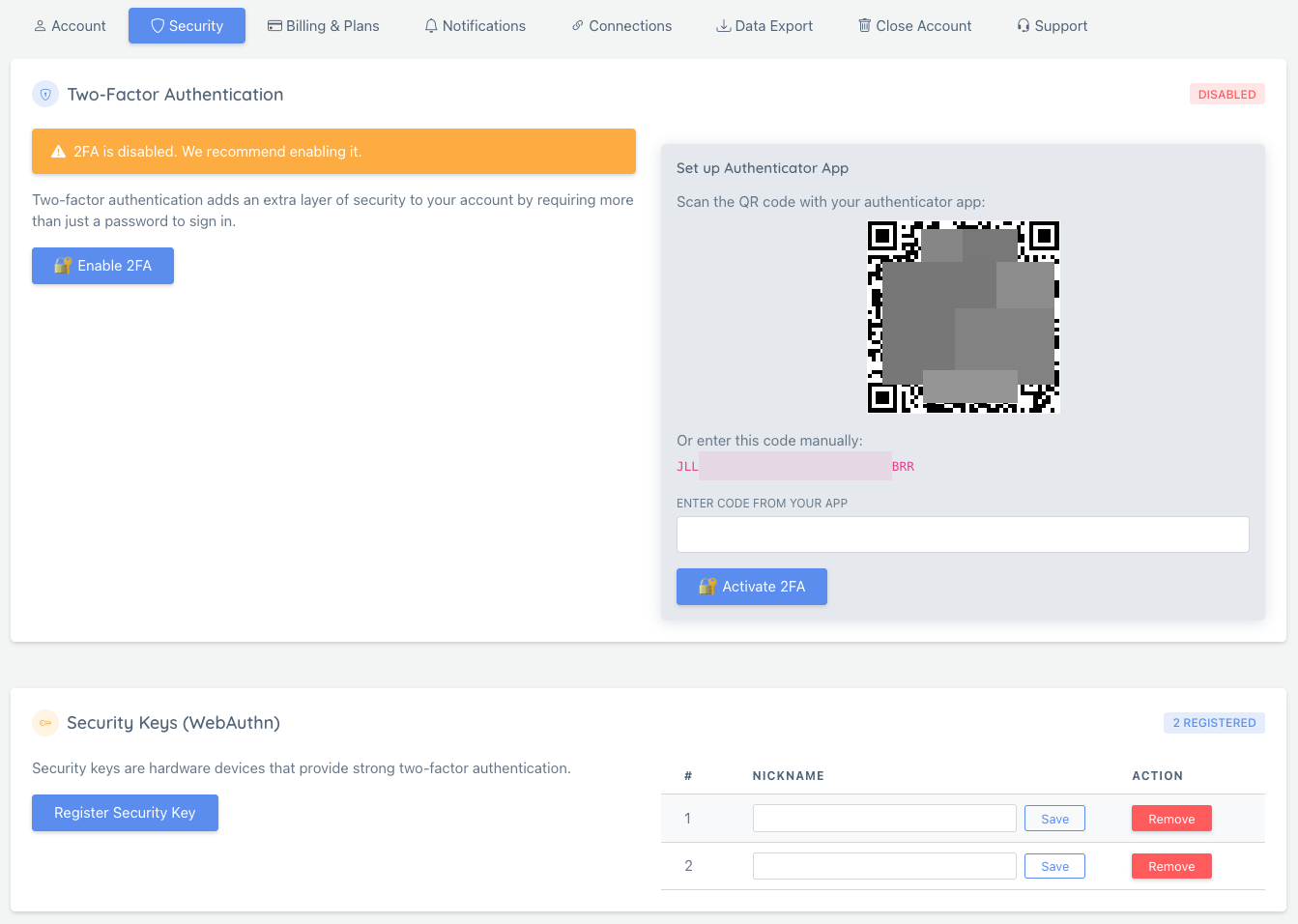
You can manage 2FA from your dashboard’s Security settings.
Authenticator apps (TOTP)
We support standard authenticator apps (Google Authenticator, 1Password, Bitwarden, Authy, etc.).
When you enable 2FA, you’ll see a QR code you can scan in your authenticator app. This QR code is generated and served by our app (we do not send your 2FA secret to third-party QR services).
Backup codes
When 2FA is enabled, you can also use backup codes as an alternative verification method (for example, if you lose access to your phone).
Treat backup codes like passwords:
- Store them offline (password manager or printed copy)
- Don’t share them
- Rotate/regenerate them if you suspect they were exposed
Step-up verification for sensitive actions
Some security-sensitive actions require an extra confirmation step (“step-up verification”) even if you’re already signed in. Depending on your account, you can confirm with your password, an OTP code, or a backup code.
Security Keys (Hardware Keys)
For stronger protection, you can add hardware security keys (WebAuthn) such as YubiKey. These are phishing-resistant and can’t be replayed like OTP codes.
You can add and manage security keys from your dashboard’s Security settings.
Adding and removing security keys requires step-up verification to help prevent account takeover.
Registration Process
Account Creation
When you register for an account:
- Your account is created immediately after validation
- A verification email may be sent depending on your configuration
- You can start using your account right away
Security Features
CAPTCHA Protection
Our CAPTCHA system protects your account and our service from abuse:
- Prevents automated bot registrations
- Uses honeypot fields and behavior analysis
- Non-intrusive - won’t interrupt legitimate users
Rate Limiting
We implement rate limiting to prevent abuse:
- Registration attempts are limited per IP address
- Maximum 5 registration attempts per minute from the same IP
- Helps prevent brute force attacks and spam registrations
CSRF Protection
Cross-Site Request Forgery (CSRF) protection is enabled on all forms:
- All forms include CSRF tokens that are validated on submission
- Tokens are validated on every form submission
- Helps protect against malicious sites attempting to create accounts on your behalf
- Tokens expire after a reasonable time period
Security alert emails
We send security alert emails for important security-related actions (for example: enabling/disabling 2FA, adding/removing security keys, and password set/reset flows).
If you receive an alert for an action you didn’t perform:
- Reset your password immediately
- Review your account security settings
- Contact support if you need help securing the account
Privacy & Data Protection
We take your privacy seriously and follow security best practices:
Password Storage
- Passwords are hashed using bcrypt before storage
- We never store your password in plain text
- Password hashes use work factors appropriate for current computing power
HIBP Privacy
- Password checks via HIBP use k-anonymity to protect your actual password
- Only the first 5 characters of your password hash are sent
- Your complete password never leaves our servers
Email Privacy
- Email addresses are used only for account management and notifications you’ve opted into
- We don’t sell or share your email with third parties
- You can control what notifications you receive in your account settings
For more details about how we handle your data, see our Privacy Policy and Terms of Service.
Account Recovery
If you forget your password:
- Click “Forgot Password” on the login page
- Enter your email address
- Check your email for a password reset link
- The link expires after a set time period for security
- Create a new password that passes our security checks
Need Help?
If you have questions about account security or need assistance:
- Check our other support articles in the “Account & Billing” category
- Contact our support team through the dashboard
- Review our Privacy Policy for detailed information about data handling
Your security is our priority, and we’re constantly working to improve our security measures while keeping the experience smooth and user-friendly.